
The best OSINT browser extensions: 10 tools every investigator should know

headshot of Nico Dekens – aka “Dutch OSINT Guy”Nico Dekens – aka “Dutch OSINT Guy”
5 Oct 2026
Digital globe surrounded by floating images and data screens, representing global open-source intelligence gathering and online investigations.

A capable browser is arguably the single most valuable tool in open source intelligence (OSINT) work. The right set of extensions transforms Chrome or Firefox into a functional investigation console, enabling analysts to pivot on an indicator, examine image metadata, or capture a page as evidence, all without disrupting their investigative workflow. This guide profiles 10 browser extensions widely used by experienced investigators, each accompanied by an official listing, a concise description, and an overview of its standout features.

At ShadowDragon®, we work with these tools as part of real investigative casework, so this list focuses on extensions that hold up in practice, not just in theory. Every entry was verified against its official Chrome Web Store or Firefox Add-ons listing as of 2026, and we note where an extension requires a paid plan to unlock full functionality.

We’ve provided a brief overview of what these extensions do and how to deploy them safely without putting your investigations at risk.
What OSINT browser extensions do

OSINT browser extensions add investigation features directly to Chrome or Firefox, so an investigator can collect and analyze open data from the page already in view. A tool like Mitaka allows an analyst to right-click an IP address or hash and query it against services such as VirusTotal in a single step. Others read technology stacks and expose hosting details, and some record a page as evidence.

The value here is speed and context. Rather than copying an artifact (a username, image, or hash, for example) into a separate site or tool, the analyst can act on it directly, right where it appears, which keeps a long investigation from losing momentum. Different extensions also serve different purposes, from entity extraction to operational security, so most analysts run various tools together.

How we chose these extensions

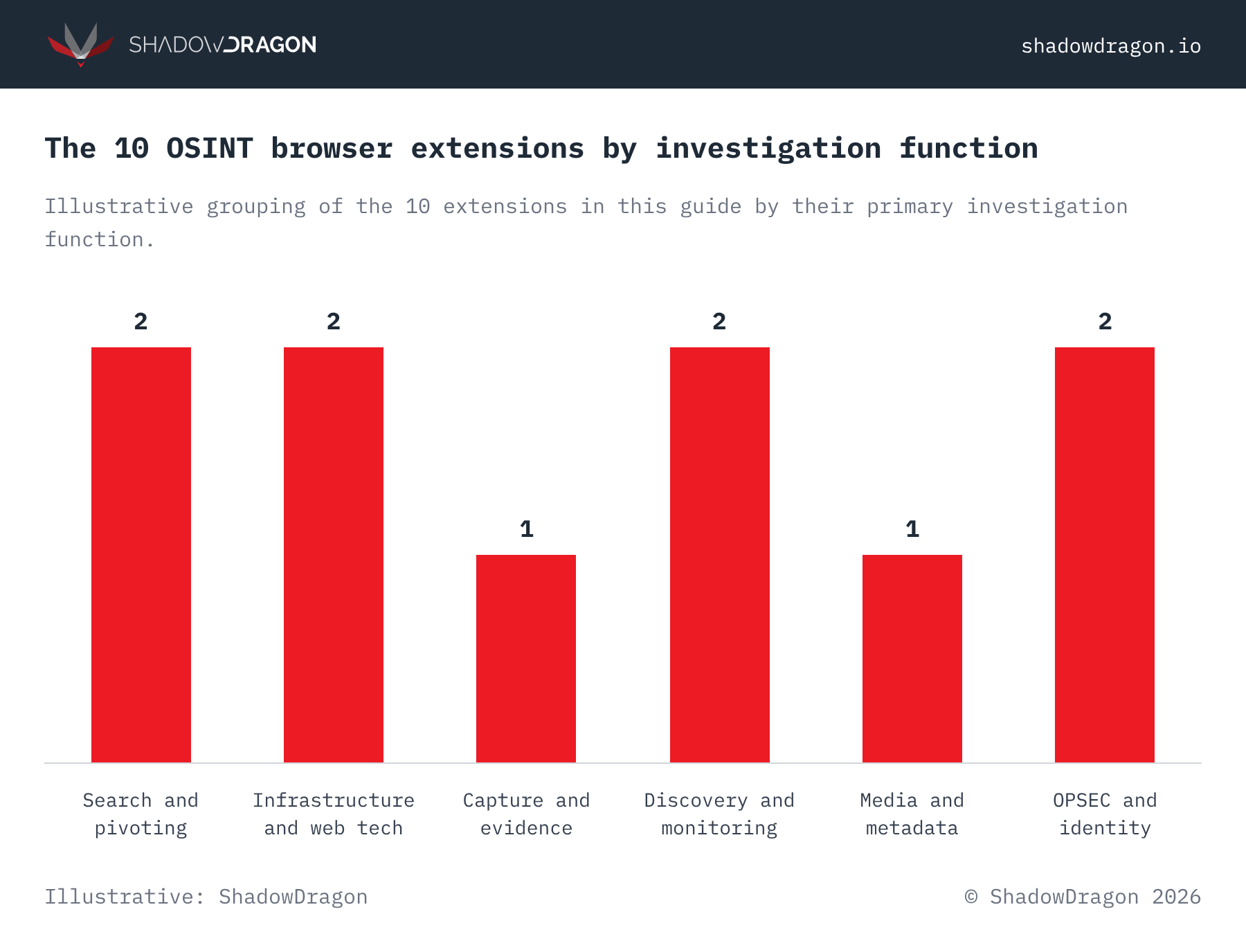
The extensions featured in this list were selected for their demonstrated utility in investigative work and their active maintenance, with each available through an official store listing. As of 2026, all 10 tools have a live Chrome Web Store or Firefox Add-ons page. Collectively, they span six primary functions, enabling teams to build a balanced toolkit rather than an unwieldy collection of overlapping utilities.

Two practical criteria informed the selection process. The first is relevance to real-world casework, spanning tasks such as indicator pivoting and evidence capture. The second is trust: because a browser extension has visibility into every page an investigator visits, provenance and permissions are critical considerations. For a broader view of the field, ShadowDragon®’s roundup of the best OSINT tools serves as a useful companion resource.

The 10 best OSINT browser extensions

These 10 extensions span six investigation functions, from artifact search to operational security. Each entry includes an official link and a two or three sentence description, along with the features that set it apart.

Artifact search

1. Mitaka

Mitaka is a search extension that lets an investigator select an IP address, domain, URL or hash on any page and query it across dozens of OSINT engines from the context menu. It also refangs obfuscated indicators, converting text like example[.]com back into a usable value. The extension is free, open source, and actively maintained by researcher ninoseki, with over 1,800 GitHub stars and regular releases.

Notable features:

  • Right-click search across VirusTotal, urlscan.io, Censys and Shodan
  • Refangs and extracts indicators of compromise automatically
  • Supports IPs, domains, URLs, hashes and file names
  • Free and open source, actively maintained with frequent updates
2. Sputnik

Sputnik lets an analyst highlight an IP, domain, file hash or URL and run it through a set of free OSINT resources with a right-click. Built by Mitchell Moser, it copies artifacts to the clipboard when a target service needs manual entry, which keeps the lookup moving. The extension is free and works on links, images and selected text.

Notable features:

  • Context-menu lookups for IPs, domains, hashes and URLs
  • Opens results directly or copies the artifact for manual sites
  • Works on selected text, links and media
  • Free, with a 5.0 rating on the Chrome listing

Evidence capture

3. Vortimo

Vortimo is an all-purpose investigation assistant that records the pages an investigator visits, stores screenshots and extracts entities such as names, emails, phone numbers and GPS coordinates. It builds a searchable map of how data connects across the sites in a case. A free tier covers core use, with paid plans for heavier work.

Notable features:

  • Records pages and captures screenshots during browsing
  • Extracts and links entities across visited pages
  • Builds a searchable, linked map of collected entities
  • Bookmarks pages and highlights key content across a case
4. Distill Web Monitor

Distill Web Monitor watches a page or a selected part of it and alerts the investigator when the content changes. Investigators use it to track a profile, listing or forum thread without checking it by hand. The free tier covers local monitoring, with paid plans for cloud checks and more notifications.

Notable features:

  • Monitors full pages or selected content blocks
  • Alerts by email, push, Slack or Discord
  • Selects content with CSS, XPath or regex
  • Highlights and logs each detected change

Infrastructure and hosting intelligence

5. Wappalyzer

Wappalyzer identifies the technologies behind a website, from content management systems and frameworks to analytics, payment processors and CDNs. It recognizes web technologies across dozens of categories, which helps an analyst profile a target’s technology stack. The extension’s core detection features are available at no cost, with paid subscription tiers offering expanded capacity for large-scale or API-based lookups.

Notable features:

  • Detects web technologies across dozens of categories
  • Reveals CMS, frameworks, analytics and payment tools
  • Exports results to CSV
  • Free browser detection, with paid API tiers
6. DNSlytics IP Address and Domain Information

DNSlytics provides investigators with detailed intelligence on any IP address, domain or hosting provider from a single click in the toolbar. It surfaces WHOIS records, DNS data and ASN and routing details, as well as blacklist status, offering a fast, at-a-glance infrastructure lookup. The extension is free to use, with more comprehensive reports available on the DNSlytics website.

Notable features:

  • IP and domain WHOIS, DNS and blacklist checks
  • Provider, ASN and BGP routing details
  • Available for Chrome and Firefox
  • Free lookups, with paid plans on the main service

People and contact discovery

7. Hunter Email Finder

Hunter finds email addresses tied to the web domain being viewed and shows the common address patterns an organization uses. When an analyst enters a name, it returns a likely address with a confidence score and sources. A free plan covers 25 searches a month, with paid tiers for higher volume.

Notable features:

  • Domain search for addresses and email patterns
  • Name-to-email lookup with confidence scoring
  • Detects article authors and their contacts
  • Free tier of 25 searches per month

Image and media verification

8. EXIF Viewer Pro

EXIF Viewer Pro lets an investigator right-click any image on a page and read its embedded metadata in a side panel, including camera details and GPS coordinates when present. Photo metadata often reveals the device and time, and sometimes the location, which makes it valuable for verification. The extension supports more than 300 cameras and needs no account.

Notable features:

  • Reads EXIF metadata from images on any page
  • Surfaces GPS coordinates when embedded
  • Histogram and RGB color analysis
  • Copies metadata to the clipboard, no login required

Browser extensions for operational security

9. User-Agent Switcher and Manager

User-Agent Switcher and Manager lets an investigator change the user-agent string the browser reports, so a session can present as a different device or browser. Built by ray-lothian, it is an operational security staple for viewing mobile page versions or reducing how identifiable a session is. The extension is free and open source, with per-site control.

Notable features:

  • Sets custom user-agent strings per site or window
  • Randomizes the user-agent on a schedule
  • Supports Client Hints and modern spoofing methods
  • Free, open source and light on resources
10. Firefox Multi-Account Containers

Firefox Multi-Account Containers, built by Mozilla, keeps parts of a browsing session separated into color-coded container tabs with isolated cookies. Investigators use it to run several accounts or personas at once without cross-contaminating sessions. The extension is free and integrates with Mozilla VPN for per-container routing.

Notable features:

  • Isolates cookies and storage per container
  • Runs multiple accounts on one site at once
  • Color-coded tabs for clean persona separation
  • Optional per-container VPN routing

How to choose an OSINT browser extension

Investigators should select extensions according to the task at hand and keep the toolkit deliberately small. A well-rounded kit in 2026 typically pairs a search tool such as Mitaka, an infrastructure lookup such as Wappalyzer or DNSlytics, a capture tool such as Voritmo and an operational security layer such as Multi-Account Containers. Together, this combination addresses pivoting, enrichment, documentation and safety.

Permissions warrant careful consideration. Because an extension with page-read access can potentially see sensitive case data, investigators should install only tools with a clearly identified developer and a published privacy policy, sourced from an official listing. A small set of vetted, trusted extensions is inherently safer than a crowded toolbar of unverified tools. ShadowDragon®’s hub of free OSINT tools offers a useful starting point for extending an investigative kit beyond the browser.

How to install an OSINT browser extension safely

Investigators should install OSINT browser extensions exclusively from their official Chrome Web Store or Firefox Add-ons listing and verify the developer prior to installation. Every extension featured in this guide links directly to its official listing, which should serve as the definitive starting point rather than a search result or third-party mirror site. Analysts should confirm that the publisher name matches the legitimate project (e.g., ninoseki for Mitaka or Mozilla for Multi-Account Containers) as lookalike builds frequently replicate the names of popular tools.

Teams should review the requested permissions before installing any extension. An extension with the ability to read data on every site visited can also access sensitive case material, so broad permissions warrant closer scrutiny of the developer and privacy policy beforehand. Following installation, investigators should pin only the tools used on a daily basis and disable the remainder, limiting the number of extensions with access to any given page.

Investigators should test each extension within a dedicated investigation profile before deploying it to live casework. A separate profile keeps investigation-related cookies, history and logins isolated from personal accounts. It also allows an analyst to remove a questionable extension without disrupting their primary browser setup.

Operational security when using extensions

Operational security is critical because extensions with page-read access can inadvertently expose an investigator’s identity alongside the data they collect. Persona separation through tools such as Multi-Account Containers, combined with user-agent control, helps maintain a clear distinction between an investigation account and an investigator’s real identity. Analysts should treat every extension as a potential data channel and review its permissions carefully before installation.

Two habits help safeguard a case. First, investigators should maintain a dedicated browser profile for investigative work, ensuring that tooling and cookies never intermingle with personal accounts. Second, they should verify that each extension is the official build, as lookalikes with similar names appear across every major store.

Beyond the browser: where ShadowDragon® fits

Browser extensions excel at single lookups, but a comprehensive investigation requires identity resolution and mapping at scale. Horizon® Identity connects a selector (e.g., a name or handle) to related accounts, contacts and associated activity across 600+ data sources within a single workflow. This breadth transforms a series of manual browser checks into a structured, comprehensive picture of a subject.

Extensions answer one question at a time; a platform reveals how those answers connect. The Horizon® platform is a browser-based solution that unifies collection, link analysis and monitoring within a single investigation environment, turning the manual pivots an investigator makes by hand into a repeatable, scalable workflow.

Frequently asked questions

Are OSINT browser extensions free?

Many are entirely free to use, including Mitaka, Sputnik, EXIF Viewer Pro and Firefox Multi-Account Containers. Others operate on a freemium model, in which core functionality is free while higher-volume usage or advanced data access requires a paid plan, as is the case with Wappalyzer and Hunter.

Which browser is best for OSINT extensions?

Chrome and Firefox both have strong extension libraries, so most investigators operate both. Firefox has a unique advantage in Multi-Account Containers for persona separation, while Chrome hosts the widest selection of search and infrastructure tools. Running the two side by side lets you match each task to the better option.

Are OSINT browser extensions safe to use?

Reputable extensions from official store listings are generally safe, but every extension that reads page content is a privacy consideration. Investigators should install only tools that have a named developer and a clear privacy policy, with permissions that fit their purpose. A dedicated investigation profile keeps extension access away from personal accounts.

Do these extensions collect data on the people I investigate?

These tools query data that is already publicly available, such as WHOIS records, image metadata or the technologies a website runs on. They surface existing public information rather than generating new private information about a subject. That said, how you use, store, and handle the results is governed by your own organization’s legal and policy guidance, which varies by jurisdiction and role.

Can browser extensions replace a full OSINT platform?

No. Extensions handle single lookups well, but they don’t resolve identities, map relationships, or connect findings across hundreds of data sources the way a dedicated platform can. For casework at scale, the Horizon® platform brings those individual findings together into a single, structured picture of a subject. Most teams use extensions for quick, in-the-moment pivots and rely on a platform like Horizon® to carry out the full investigation.

Start an investigation with ShadowDragon®

Browser extensions enable an investigation to begin quickly, but transforming scattered lookups into a resolved identity is where a dedicated investigation platform demonstrates its value. Teams ready to experience the difference can request a demo of the Horizon® platform and see firsthand how it maps accounts, contacts and broader networks across 600+ data sources within a single workflow.