12 best OSINT username lookup tools for investigators

headshot of Nico Dekens – aka “Dutch OSINT Guy”Nico Dekens – aka “Dutch OSINT Guy”
6 Oct 2026
Digital profile cards displayed over a laptop, representing OSINT username lookup and cross-platform account discovery.

A username is often among the most durable identifiers available in an investigation. Because individuals tend to reuse the same handle across multiple platforms, a single alias can serve as a starting point for mapping an individual’s broader online presence. Username lookup, also referred to as account enumeration, is the practice of querying that handle against numerous platforms simultaneously to identify where a subject maintains an active presence or can be useful with validating and correlating historical or dormant accounts.

For law enforcement and corporate security investigators, as well as threat intelligence teams, this technique frequently serves as the initial pivot point in a case. A confirmed account on one platform can lead to the identification of a real name or location, and may also surface an associated email address. The 12 tools outlined below represent the standalone lookup utilities every investigator should be familiar with, ranging from open-source command-line utilities to rapid web-based checkers.

This article also addresses the limitations of these free tools and where an enterprise solution such as the Horizon® platform extends investigative capability. We begin with a brief overview of what username lookup entails and why it is significant to investigative work.

What is username lookup in OSINT?

Username lookup in open source intelligence (OSINT) refers to the process of checking a single handle against numerous platforms to identify where an associated account exists. This technique is also known as account enumeration or username enumeration. Tools such as Sherlock can query more than 400 sites in a single command, returning the profile URLs that resolve to active accounts.

The underlying logic is straightforward. Many individuals select a memorable handle and reuse it or a variable of it across platforms, so the same string frequently appears on Reddit and GitHub, as well as across social media platforms and niche forums. Validating these accounts and aliases provides investigators with starting points to verify and cross-reference, enabling them to expand their findings into a more comprehensive picture.

Why username lookup matters for investigators

Username lookup is significant because a single confirmed handle may lead to and reveal an entire network of accounts, contacts, and associated activity. Analysts routinely begin with one username and pivot outward across dozens of platforms. The technique is both fast and repeatable, and it relies exclusively on open data that is accessible to anyone.

Speed is the primary practical benefit. Rather than searching platform by platform, a single query can quickly surface dozens of leads. Accuracy is equally important, as an effective tool minimizes false positives that would otherwise consume valuable review time. For a broader view of how these checks fit within a complete investigation, our guide to the best OSINT tools covers the broader terrain.

The 12 best OSINT username lookup tools

These 12 username lookup tools range from open source command-line utilities to instant web checkers. Each entry below includes an official link and a short description, along with the features that set it apart.

1. Sherlock

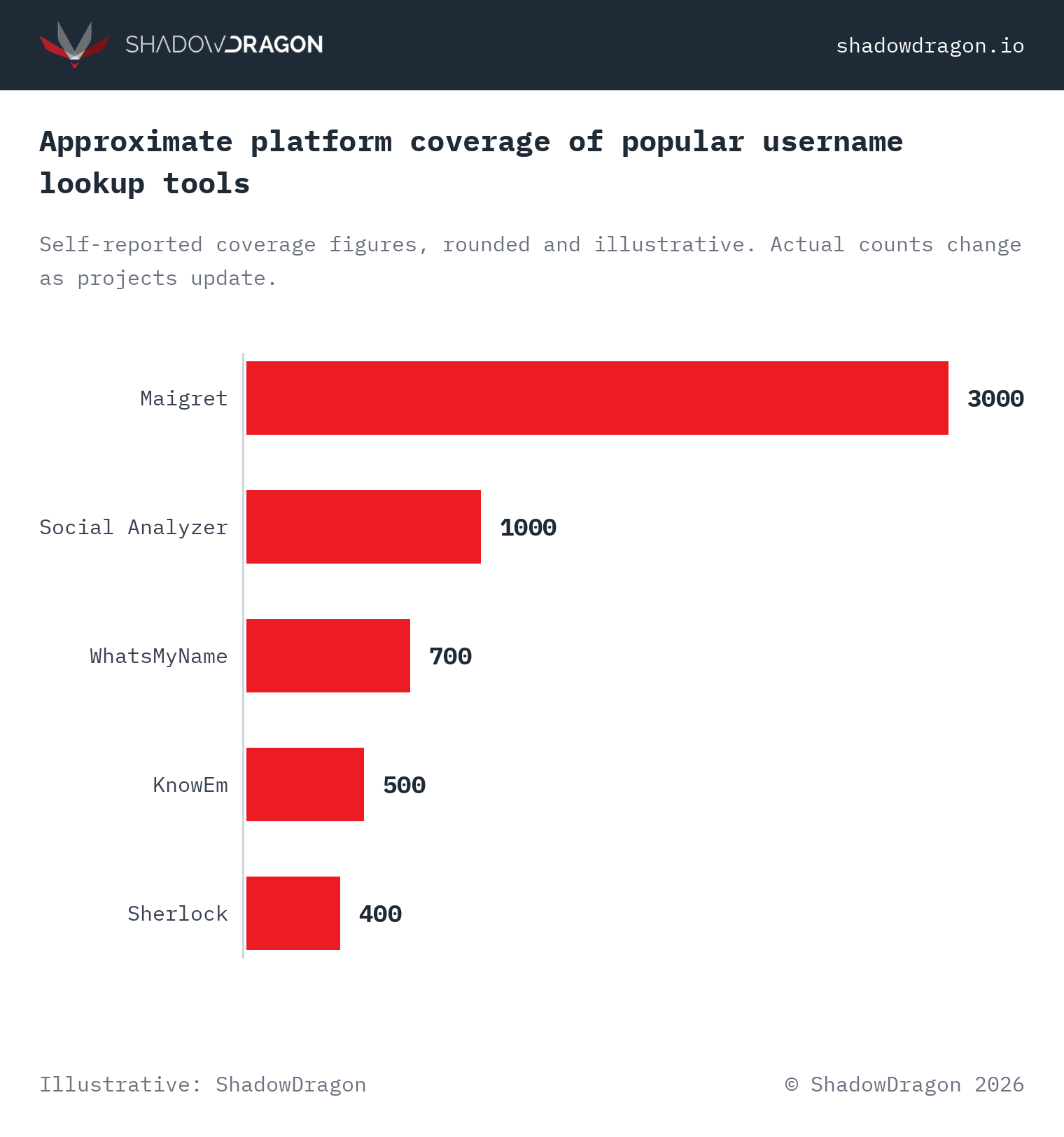
Sherlock is a command-line tool that locates accounts tied to a single username across more than 400 social networks. Investigators run it with one command and receive a list of live profile URLs quickly. The project is open source and maintained by an active community.

Notable features:

  • Checks 400+ sites from a single command-line query
  • Exports results to CSV and plain text, along with clickable links
  • Runs on Windows, macOS and Linux, plus Docker
  • Ships in Kali Linux, so no separate install is needed

2. Maigret

Maigret collects a dossier on a person from a username across 3,000+ sites. It grew out of the Sherlock project and adds profile parsing, so it returns bio details and avatars rather than a simple yes or no. It also surfaces linked accounts. Analysts can run it from the terminal or through a hosted web version.

Notable features:

  • Coverage of 3,000+ sites, the widest of the open tools
  • Extracts profile data such as names and bios, plus account IDs
  • Generates HTML and PDF reports for case files
  • Recursive search that follows linked usernames and IDs

3. WhatsMyName

WhatsMyName, maintained by Micah Hoffman (WebBreacher), is a community dataset of 700+ sites that powers many other username tools. Investigators can use the web version at whatsmyname.app or pull the JSON file into their own workflows. It is one of the most trusted enumeration references in OSINT.

Notable features:

  • Open dataset of 700+ validated sites
  • Free web interface with category filters
  • JSON format that plugs into other OSINT tools and custom scripts
  • Actively curated with false-positive checks

4. Blackbird

Blackbird searches for accounts by username and by email across 600+ platforms. It runs from the command line and draws its site list from the WhatsMyName dataset, which keeps false positives low. Results export to CSV or PDF for a case file.

Notable features:

  • Searches by both username and email address
  • Command-line tool written in Python
  • Exports results to CSV or PDF
  • Draws its 600+ site list from WhatsMyName data

5. Namechk

Namechk checks a username and domain name across 100+ social networks and dozens of domain extensions at once. It was built for brand registration, yet investigators use it for fast triage of where a handle is claimed. The service is free and needs no account.

Notable features:

  • Checks usernames across 100+ platforms and 30+ domain extensions
  • Instant visual grid of taken versus available handles
  • No login required for a basic search
  • Doubles as a domain availability lookup

6. KnowEm

KnowEm verifies username availability across more than 500 social networks through a single search interface. Brand teams rely on it to secure handles, while investigators use it to determine where a given name is already in use. A free search covers the most widely used networks, with expanded coverage available on a paid tier.

Notable features:

  • Coverage of 500+ social networks
  • Groups results by category (social, blogging, business)
  • Trademark and domain checks in the same interface
  • Optional paid registration service

7. Instant Username Search

Instant Username Search checks a handle across more than 100 popular platforms in real time as the investigator types, with results appearing immediately rather than after a completed scan. It serves well as a rapid, free initial pass before an analyst proceeds to more comprehensive tools.

Notable features:

  • Real-time results across 100+ sites
  • Clean interface with no account needed
  • Dedicated checkers available for Instagram, TikTok and other networks
  • Free to use

8. NameCheckup

NameCheckup checks social media handles and domain names for availability in a single view. It focuses on the major networks most relevant to early-stage triage. The tool is free and returns results quickly.

Notable features:

  • Checks major social platforms and domains simultaneously
  • Simple, single-field search interface
  • Clear indicators distinguishing available from taken handles
  • No registration required

9. Social Analyzer

Social Analyzer is available as an API and a CLI, and also as a web app, for finding a person’s profile across roughly 1,000 social media sites. It adds a detection rating on top of a raw match, which helps reduce false positives. Analysts can incorporate it into larger pipelines through its API.

Notable features:

  • Coverage of around 1,000 sites
  • Interfaces for the API and command line, plus a web app
  • Detection rating to score match confidence
  • String analysis and profile extraction options

10. Snoop

Snoop is an open source project that searches for accounts tied to a username across a large list of public sites. Documentation is Russian-first, although English guides are available. The tool runs on desktop and Android. It’s well-suited for investigators who want broad coverage from the command line.

Notable features:

  • Searches a large site list (5,400+ in web-base mode)
  • Runs on desktop and Android (via Termux)
  • Sorts results by country or alphabetically
  • Open source and free

11. UserSearch.org

UserSearch.org is a reverse-username platform that pulls together results from social networks and dating sites, in addition to forums. It is aimed at investigators who need to enrich a single handle into a fuller profile. A free tier exists, with more sources available on paid plans.

Notable features:

  • Reverse search across social and dating sites, plus forums
  • Enrichment from a username to related accounts
  • Free tier plus paid investigator plans
  • Web-based, with no install needed

12. IDCrawl

IDCrawl is a people-search engine with a dedicated username lookup function that surfaces matching profiles across networks including Instagram, TikTok, Facebook and others. It returns profile images and supporting context, which expedites manual review. Basic searches are free, with additional data available on a paid plan.

Notable features:

  • Username search across major social networks
  • Returns profile images and supporting context
  • Also supports search by name and email address, plus phone number
  • Free basic search with paid enrichment options

How to run a username search step by step

Investigators should conduct a username search by starting with a single confirmed handle, checking it across multiple platforms, and verifying every hit before acting on it. A complete pass can be conducted efficiently. The five steps below apply regardless of whether an analyst runs Sherlock from the command line or uses a web-based checker such as Namechk.

  1. Collect the seed handle. Begin with the username already in hand, along with obvious variants such as added numbers or underscores. A first-initial-plus-surname pattern is another common variant worth testing.
  2. Run a broad scan. Start with a high-coverage tool. Maigret covers more than 3,000 sites and Sherlock covers more than 400, so a single command quickly returns an extensive candidate list.
  3. Filter the results. Set aside parked pages and generic or inactive profiles. A tool with a detection rating, such as Social Analyzer, scores each match so analysts can prioritize the strongest hits for review.
  4. Verify each account manually. Open the live profile and confirm that the avatar, bio, and post history are consistent with the subject. Because free tools can produce false positives, every hit should be treated as a lead requiring confirmation rather than as a verified result.
  5. Pivot outward. A confirmed account can reveal a linked email address or a real name. Where only a name or handle is available, a tool such as ShadowDragon®’s free Email Permutator can generate plausible email candidates to test. Any newly discovered handle or address can seed the next scan, allowing the process to repeat on each new identifier.

This cycle of scanning, verifying, and pivoting is what transforms a single handle into a mapped network of accounts. A professional platform performs the same process across more than 600 data sources simultaneously. This is where Horizon® Identity, part of the Horizon® platform, extends investigative capability.

How to choose a username lookup tool

Investigators should select a username lookup tool by aligning its coverage and output format with their specific workflow. Command-line tools such as Maigret and Sherlock are well suited to repeatable, scriptable work across thousands of sites, while web-based checkers such as Namechk and Instant Username Search are better suited to quick, no-install triage across major platforms.

Two practical factors distinguish reliable tools from unreliable ones. The first is false-positive control: a tool that reports nonexistent accounts imposes unnecessary review time on the investigator. The second is export functionality, as results saved in CSV or PDF format integrate cleanly into a case file.

Taking username lookup further with Horizon® Identity

The 12 tools above are well suited to a fast, single-handle check, but professional investigations typically require identity resolution at scale. Horizon® Identity connects a username to related accounts, contacts, and associated activity across more than 600 data sources within a single workflow. This breadth allows investigators to pivot from one handle to a fully mapped network without manually assembling results from multiple tools.

Standalone tools answer where a handle exists. A platform answers who is behind it and how the accounts connect. For investigators building a free-first toolkit, our list of free OSINT tools serves as a useful companion to this roundup.

Frequently asked questions

Is username lookup legal?

Username lookup queries public data, so checking where a handle exists is generally legal for investigators. The results come from open profiles the same way a normal search would return them. Rules on how the findings are used vary by jurisdiction and by role, so investigators should follow their own legal and policy guidance.

What is the difference between username lookup and people search?

Username lookup starts from a handle and finds accounts that use it, while people search starts from a different identifier, such as a name or an email address, and sometimes a phone number. The two overlap. Tools like IDCrawl do both. In practice, investigators often begin with a username, then pivot into people-search data to confirm identity.

Which username lookup tool checks the most sites?

Maigret checks the most sites of the open source tools, with coverage of 3,000+ platforms. Social Analyzer reaches around 1,000 sites. Sherlock covers more than 400. More sites can mean more leads, though it can also mean more false positives and more time spent on verification.

Are free username lookup tools accurate?

Free tools are generally accurate enough for an initial pass, though they can produce false positives that require manual confirmation. Detection quality varies across tools, so cross-checking a hit is advisable before treating it as a confirmed account. For high-stakes cases, an investigation platform provides additional verification and context that free tools do not offer.

Can I automate username lookups?

Yes. Command-line tools such as Sherlock, Maigret, and Snoop are built for automation and scripting. Social Analyzer also exposes an API that can be called directly from custom code. For team-scale work, a platform such as Horizon® Identity resolves identities across more than 600 data sources without the overhead of maintaining a separate set of scripts.

Start an investigation with ShadowDragon®

Username lookup is only the first step. Turning a single handle into a resolved identity across hundreds of data sources is where an investigation platform makes the difference. To see how Horizon® Identity maps accounts and contacts into connected networks within a single workflow, request a demo of the Horizon® platform.