Google dorks: the ultimate list of search operators and commands

headshot of Nico Dekens – aka “Dutch OSINT Guy”Nico Dekens – aka “Dutch OSINT Guy”
26 Aug 2026
Close-up of a web browser displaying a search results page with search and filtering options

Google dorks are advanced search queries that combine ordinary Google operators to surface information that is already publicly indexed. Investigators use them to locate specific file types and exposed pages, as well as social media profiles and published contact details, quickly. The technique requires no special access and no custom software, only a precise query.

This reference guide explains what Google dorks are and how the core operators work and demonstrates how to combine them for real investigative results. It includes ready-to-run examples for social media and email addresses, as well as LinkedIn profiles. We wrote this guide for analysts who run authorized investigations and want a single, dependable reference to return to.

Every query in this guide targets content that Google has already crawled and indexed. Applied responsibly, dorking is an efficient method for locating public information. Applied without care, it can consume hours of investigative time or cross legal and ethical boundaries. For that reason, we address the guardrails before the techniques themselves.

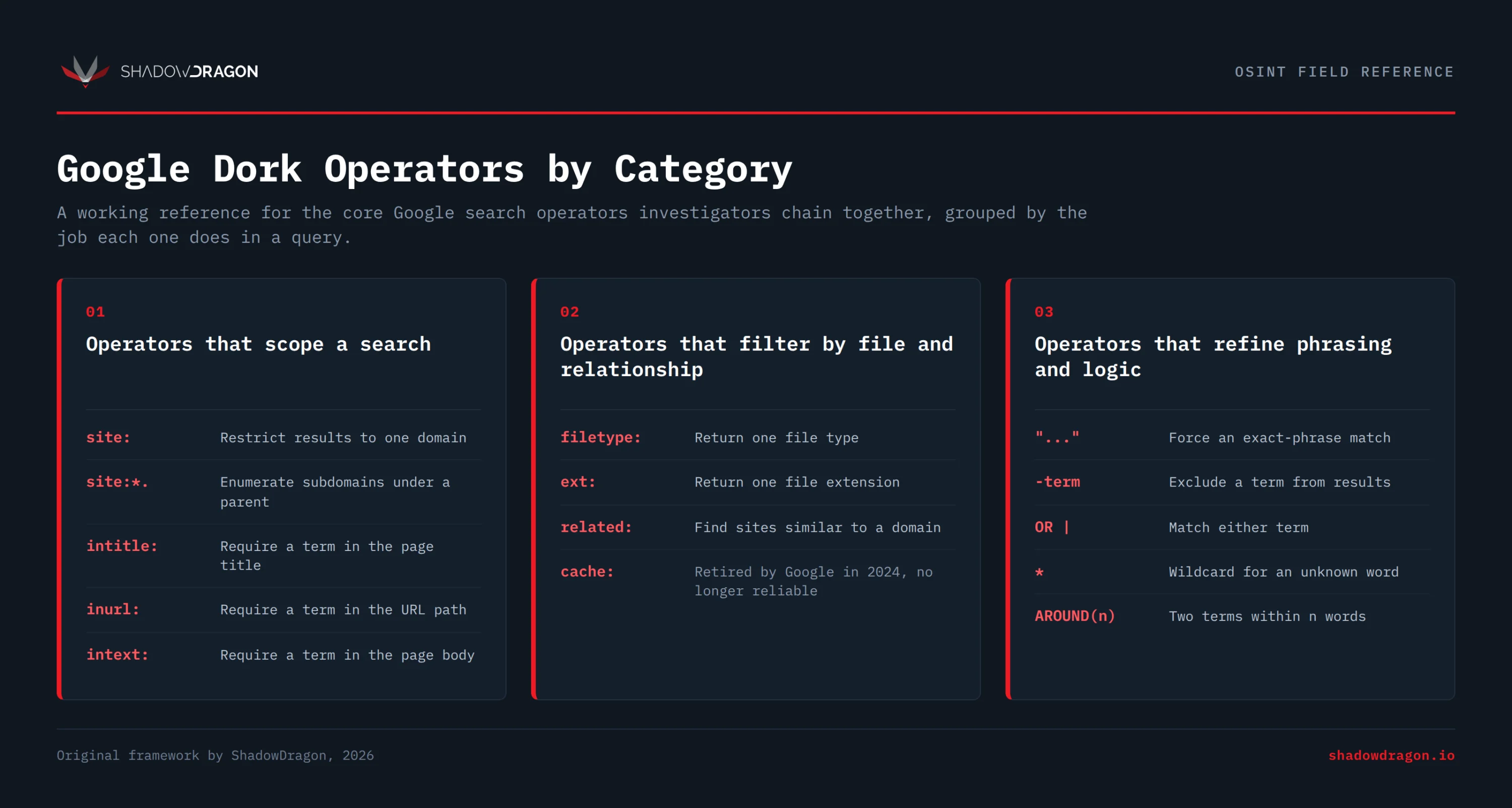
ShadowDragon chart categorizing Google dork operators for scoping searches, filtering by file type and relationship, and refining search phrasing and logic
Google dork operators grouped by function, including operators that scope searches, filter results by file type and relationship, and refine phrasing and logic.

What are Google dorks?

Google dorks are search strings that use standard Google search operators to pinpoint publicly indexed information. The practice is also called Google dorking or Google hacking. Security researcher Johnny Long pioneered it, cataloging these queries from 2002 and organizing them into the Google Hacking Database in 2004. A dork does not break into anything. It asks Google to return pages it has already crawled, filtered by signals such as domain and file type, among others.

The value comes from precision. A plain search for a company name returns millions of results. A dork such as site:example.com filetype:pdf narrows that to indexed PDF documents on one domain. Analysts use this to locate exposed spreadsheets and cached login portals, along with staff directories and forgotten test environments.

Responsible use is not optional. Investigators should only run these queries as part of an authorized investigation with a clear legal basis, whether a law enforcement inquiry or a corporate security review. Permission-based threat intelligence work qualifies as well. Accessing content behind a login or downloading data that an investigator is not authorized to hold can violate computer misuse laws. Acting on exposed credentials carries the same risk. Dorking surfaces public information. It does not grant permission to misuse what an investigator finds.

Federal agencies have publicly flagged how much sensitive data these queries can surface.

“By searching for specific file types and keywords, malicious cyber actors can locate information such as usernames and passwords, e-mail lists, sensitive documents …” – DHS, FBI and NCTC bulletin (2014)

That federal warning is why ShadowDragon® treats authorization and a clear legal basis as the first step rather than an afterthought.

Google dorking is one piece of a larger open source investigation. ShadowDragon® builds tools that accelerate manual searches and makes investigations easier moving from a single search string to a repeatable, documented workflow. For a broader view of what else belongs in that workflow, see our roundup of the best OSINT tools.

How to use Google dorks effectively

Effective Google dorking doesn’t require memorizing hundreds of operators. It comes from learning a small set of them well and combining them in different ways. Fewer than a dozen operators cover most investigative needs. Investigators mix and match this same core set, chaining two or three together, to tighten each query for the task at hand. Below are the core building blocks with a working example for each.

Operators that scope a search

The site: operator limits results to one domain, for example site:example.com. Investigators can add a subdomain wildcard with site:*.example.com to enumerate hosts under a parent domain.

The intitle: operator requires a word or phrase in the page title, as in intitle:“data breach”. Its cousin inurl: requires a term in the URL path, such as inurl:login, which is useful for finding admin and portal pages.

The intext: operator forces a term to appear in the body of the page, for example intext:“internal use only”. This keeps results focused on documents that actually contain the keyword rather than merely linking to it.

Operators that filter by file and relationship

The filetype: operator returns a single file type, such as filetype:pdf. The ext: operator does the same job by file extension, for example ext:xlsx. The two are interchangeable in practice.

The related: operator surfaces sites Google considers similar to a given domain, as in related:example.com. The cache: operator once returned Google’s stored copy of a page, but Google removed the cached-page feature in 2024, so it no longer works reliably.

Operators that refine phrasing and logic

Quotation marks force an exact match. Searching “chief information security officer” returns that exact phrase rather than the individual words. The minus operator excludes terms, so site:example.com -inurl:blog drops blog pages from the results.

The OR operator (or the pipe character |) matches either term, for example (report OR memo). The wildcard * stands in for an unknown word, as in “budget for * quarter”. The AROUND(n) operator finds two terms within a set number of words of each other, so “john doe” AROUND(5) “example corp” requires the names to appear close together.

When investigators chain these together, precision climbs quickly. A query like site:example.com filetype:pdf intext:“confidential” -inurl:careers scopes to one domain and one file type. It also applies one keyword and one exclusion, all in a single line.

Tips for building reliable dorks

Start broad, then narrow. Run a simple site: query first to confirm the domain is indexed, then add operators one at a time to see what each change removes. This prevents over-filtering and missing the needed result.

Be mindful of the syntax. Google does not tolerate a space after a colon, so site: example.com fails while site:example.com works. Group alternatives in parentheses when mixing OR with other operators, since order changes the meaning.

Be sure to document what works. A dork that surfaces useful pages on one target often works on the next with the domain swapped. Keeping a tested set of queries turns an ad hoc search into a repeatable step in the workflow.

The complete list of Google dork operators

The table below lists the Google dork operators that matter most in day-to-day investigations, with a short description and a syntax example for each, cross-checked against Google’s official search operators reference. The table flags the operators whose behavior Google has changed, so you won’t waste time on queries that no longer return useful results.

Operator Function Example
site: Restrict results to one domain or subdomain site:example.com
site:*. Enumerate subdomains under a parent domain site:*.example.com
intitle: Require a term in the page title intitle:"index of"
allintitle: Require every term in the title allintitle: budget report
inurl: Require a term in the URL path inurl:admin
allinurl: Require every term in the URL allinurl: login portal
intext: Require a term in the page body intext:"internal use only"
allintext: Require every term in the body allintext: username password
filetype: Return one file type filetype:pdf
ext: Return one file extension ext:xlsx
related: Find sites similar to a domain related:example.com
cache: Retired by Google in 2024, no longer reliable cache:example.com
"..." Force an exact-phrase match "chief security officer"
- Exclude a term -inurl:blog
OR or | Match either term (pdf OR docx)
* Wildcard for an unknown word "budget for * quarter"
AROUND(n) Two terms within n words "acme" AROUND(4) "breach"

Keep this list close, while remembering that Google adjusts operator behavior without notice. Test each query and confirm the results match the intent before relying on them.

The operators prefixed with all, such as allintitle: and allinurl:, apply their condition to every term that follows rather than only the next one. They are stricter than their single-term versions, so they’re often used to reduce a noisy result set to exact matches. Combine them sparingly, since a query with too many required terms can return nothing at all.

Google dorks for social media

Google dorks for social media use the same site: scoping technique to find profiles, posts, and mentions across platforms. Most major platforms expose public pages that Google indexes, so pairing a site: query with a name or handle returns results quickly, whether the target is a profile page, a specific post, or just a mention buried in someone else’s content. Because these queries need only a name or handle to run, they’re a strong first pivot: use them to scope a search in seconds, before moving on to dedicated identity tools for deeper analysis.

Investigators can use site:x.com “example corp” to find posts and profiles on X that mention a company. Swap the domain (site:instagram.com, site:tiktok.com, site:facebook.com) to repeat the pattern on other platforms.

To find a specific handle, try site:tiktok.com “@username” or site:instagram.com inurl:username. To surface where a person is discussed rather than where they post, run site:reddit.com “example corp” to pull community threads and mentions.

Employer signals are another useful angle. A query such as site:facebook.com “works at Example Corp” returns public profiles that list a company, which helps an investigator map a workforce during an authorized review. Pair a name with a location, for example “jane doe” “London” site:linkedin.com, when common names return too many matches.

Cross-platform pivots are where dorking shows its limits. A single handle can appear on a dozen data sources. Manual queries do not connect them. The Horizon® platform resolves identities and maps networks across more than 600 data sources, which turns a scattered set of profiles into one connected picture.

Google dorks for finding email addresses

Google dorks for finding email addresses work by searching indexed pages for the @ pattern common to email formats (e.g., [email protected]), rather than a specific person’s name. Organizations often expose staff addresses without realizing it, not just on contact pages, but inside PDFs, directories, and other documents Google has indexed. A dork that combines this pattern with a target domain can surface all of them in a single query.

Start with site:example.com intext:“@example.com” to find addresses published anywhere on a target domain. To find the same addresses referenced elsewhere, they can invert the logic with “@example.com” -site:example.com, which returns third-party pages that mention the domain’s email format.

Documents are a rich source. Run intext:“@example.com” filetype:pdf to pull addresses embedded in reports and presentations. Forms are another common source. To confirm a naming convention, search a known name such as [email protected] and note whether Google returns matches.

Some organizations obscure addresses to slow automated collection. If a plain query returns little, try common variants such as “jane [dot] doe [at] example [dot] com”, or search for the address inside spreadsheets with ext:xlsx “@example.com”. Always cross-check anything you find, since indexed addresses can be outdated or belong to former staff.

Once you know the format, permutation becomes the next step. ShadowDragon®’s free Email Permutator generates likely address variants from a name, which pairs well with the verification queries above.

Google dorks for finding LinkedIn profiles

Google dorks for finding LinkedIn profiles rely on scoping searches to the linkedin.com/in path, where LinkedIn publishes public member pages. Because LinkedIn limits its own search for non-members, a Google dork is often the faster route to a specific profile. These queries work best when a company name is combined with a job title.

Run site:linkedin.com/in “software engineer” “Example Corp” to list engineers who name a company on their profile. Change the title to another role, such as “CISO” or “director”, to map different parts of an organization.

To reduce noise, investigators can exclude unrelated pages. A query such as site:linkedin.com/in “Example Corp” -intitle:“jobs” drops recruitment listings. To locate the organization itself rather than individuals, switch the path to site:linkedin.com/company “Example Corp”.

You can also pivot on seniority and function. Combine a company with two possible titles using site:linkedin.com/in “Example Corp” (intitle:“director” OR intitle:“vp”) to map leadership in one pass. Add a location term when you need to distinguish regional offices. Public LinkedIn pages show only what a member has chosen to make visible.

LinkedIn dorking is powerful for mapping a company’s staff, yet it returns flat pages with no links between them. Building an organizational chart by hand is time-consuming. This is the point in an investigation when a link-analysis platform becomes especially useful, which the next section covers.

How ShadowDragon® helps

Manual dorking finds one profile at a time, which works for a single search but breaks down across a full investigation. Dorks are an excellent starting point, but on their own they don’t connect results across subjects, track how those results change over time, or scale to hundreds of subjects at once. ShadowDragon®’s tools take that same technique and turn it into a repeatable workflow: automating the searches, linking the results together, and monitoring them for changes. An approach built for one profile can support an investigation at scale.

For query writing itself, ShadowDragon®’s free Dork Assistant converts a plain-language research goal into a precise Google dork, so you don’t have to recall every operator. It’s one of several free OSINT tools ShadowDragon® offers for the surrounding steps of an investigation, including a tool that generates likely email address variations and one that checks images for signs of manipulation.

When an investigation outgrows manual searching, the Horizon® platform brings collection and link analysis into one browser-based workspace, and supports ongoing monitoring so investigators can quickly identify meaningful changes after the initial investigation. The Horizon® Platform helps investigators move from isolated search results to connected intelligence by resolving identities across more than 600 data sources, visualizing relationships, and supporting ongoing monitoring as new information appears.

Frequently asked questions

Are Google dorks legal to use?

Running a Google dork is generally legal, because the search itself only surfaces content that’s already public and indexed, which is no different from a standard Google search. The legal risk lies in what an investigator does with the information they find. Accessing systems behind a login, using exposed credentials, or downloading data an investigator isn’t authorized to hold can each breach computer misuse or data protection laws, depending on the jurisdiction. Investigators should document the legal basis for each investigation before running queries, and stop short of accessing anything that isn’t already public.

Do Google dork operators still work in 2026?

Most core operators still work, including site:, intitle:, inurl:, filetype:, intext: and AROUND(n). Google has changed or removed a few over time. The cache: operator stopped returning stored pages after Google retired the cached-page feature in 2024. The old + operator was removed years earlier. Investigators should test each query, since Google adjusts operator behavior without announcing such changes.

What is the difference between a dork and a normal search?

A normal search matches the query words loosely across the whole web. A dork uses operators to control exactly where and how Google looks, such as within one domain, one file type or one part of the page. The result is far higher precision, which matters when an investigator needs a specific document or profile rather than a general overview.

Can I use Google dorks for OSINT investigations?

Yes, Google dorking is a foundational open source intelligence technique. Analysts use it to find exposed documents and staff details, as well as social profiles and misconfigured pages, during authorized reviews. Dorks work best as a first pivot. For connecting results across sources and subjects, most teams move to a dedicated platform that supports link analysis and monitoring.

How do I find someone’s social media profiles with a dork?

Investigators should scope a search to each platform’s domain and add the person’s name or handle, for example site:x.com “full name” or site:instagram.com “@username”. Repeating the pattern across platforms builds a list. To connect those profiles into a single identity automatically, an identity-resolution tool such as Horizon® Identity does the correlation that manual dorks cannot.

How can I reduce my exposure to Google dorking?

Organizations limit what dorks surface by controlling what search engines index. They should remove sensitive files and directories from public access, then request removal of anything already indexed through Google Search Console. They should also configure robots.txt to block private paths and keep admin and staging areas behind authentication. Running the same dork queries against their own domain identifies exposed pages before anyone else does. Regular self-assessment turns dorking from a risk into a defensive check.

Take the next step

Google dorks give investigators speed and precision, yet the real work begins once there are results to connect. For teams ready to move from single queries to full investigations across more than 600 data sources, ShadowDragon® can help. Request a demo of the Horizon® platform to see how manual dorking scales into repeatable intelligence.