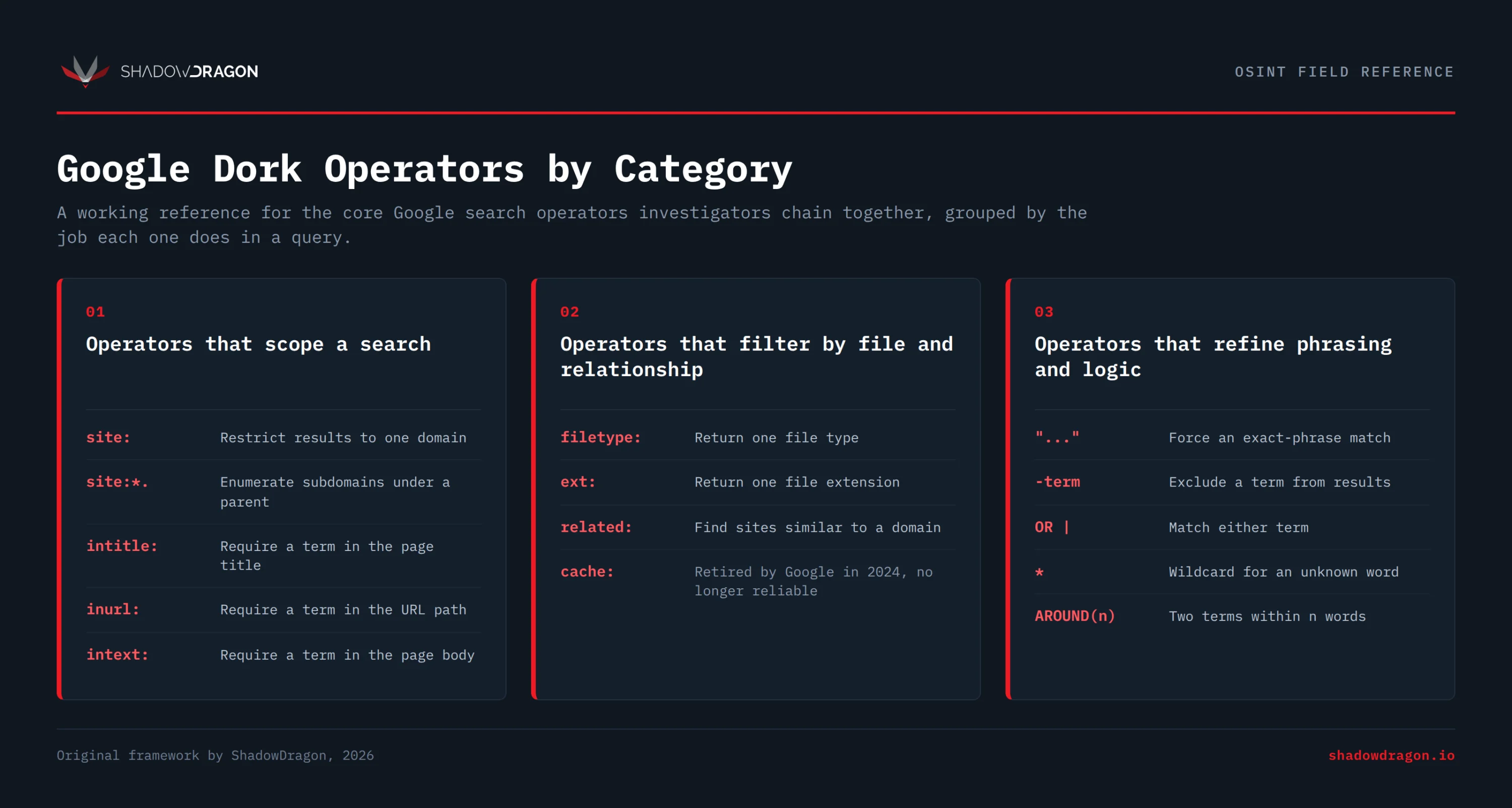
Effective Google dorking doesn’t require memorizing hundreds of operators. It comes from learning a small set of them well and combining them in different ways. Fewer than a dozen operators cover most investigative needs. Investigators mix and match this same core set, chaining two or three together, to tighten each query for the task at hand. Below are the core building blocks with a working example for each.
Operators that scope a search
The site: operator limits results to one domain, for example site:example.com. Investigators can add a subdomain wildcard with site:*.example.com to enumerate hosts under a parent domain.
The intitle: operator requires a word or phrase in the page title, as in intitle:“data breach”. Its cousin inurl: requires a term in the URL path, such as inurl:login, which is useful for finding admin and portal pages.
The intext: operator forces a term to appear in the body of the page, for example intext:“internal use only”. This keeps results focused on documents that actually contain the keyword rather than merely linking to it.
Operators that filter by file and relationship
The filetype: operator returns a single file type, such as filetype:pdf. The ext: operator does the same job by file extension, for example ext:xlsx. The two are interchangeable in practice.
The related: operator surfaces sites Google considers similar to a given domain, as in related:example.com. The cache: operator once returned Google’s stored copy of a page, but Google removed the cached-page feature in 2024, so it no longer works reliably.
Operators that refine phrasing and logic
Quotation marks force an exact match. Searching “chief information security officer” returns that exact phrase rather than the individual words. The minus operator excludes terms, so site:example.com -inurl:blog drops blog pages from the results.
The OR operator (or the pipe character |) matches either term, for example (report OR memo). The wildcard * stands in for an unknown word, as in “budget for * quarter”. The AROUND(n) operator finds two terms within a set number of words of each other, so “john doe” AROUND(5) “example corp” requires the names to appear close together.
When investigators chain these together, precision climbs quickly. A query like site:example.com filetype:pdf intext:“confidential” -inurl:careers scopes to one domain and one file type. It also applies one keyword and one exclusion, all in a single line.
Tips for building reliable dorks
Start broad, then narrow. Run a simple site: query first to confirm the domain is indexed, then add operators one at a time to see what each change removes. This prevents over-filtering and missing the needed result.
Be mindful of the syntax. Google does not tolerate a space after a colon, so site: example.com fails while site:example.com works. Group alternatives in parentheses when mixing OR with other operators, since order changes the meaning.
Be sure to document what works. A dork that surfaces useful pages on one target often works on the next with the domain swapped. Keeping a tested set of queries turns an ad hoc search into a repeatable step in the workflow.
 Nico Dekens – aka “Dutch OSINT Guy”