How to use reverse phone number lookup for OSINT

headshot of Nico Dekens – aka “Dutch OSINT Guy”Nico Dekens – aka “Dutch OSINT Guy”
4 Jun 2026
Close-up of a finger dialing numbers on a smartphone keypad, representing reverse phone lookup, phone number investigations, or mobile OSINT research
Key Takeaway

  • Reverse phone lookup starts with a phone number then leverages OSINT (public records, chat apps, social media, open source intelligence platforms) to find out who that number belongs to and map out their online presence.
  • If done right, you can transform an unknown number into a verified subject complete with named accounts, locations, and activity patterns.

Reverse phone lookup for open source intelligence (OSINT) means trying to find who owns an unknown phone number using nothing but public sources, messaging apps, social networks, and OSINT tools. When you conduct a reverse phone lookup you find out who someone is, discover associated accounts, and create profiles of related subjects by using only a single ten digit identifier. Phone numbers are one of the most powerful pivots in open-source intelligence simply because they can tie together identifiers you wouldn’t normally think to connect. Phone numbers stick with a person as they navigate messaging apps, sign-up for social networks, browse online marketplaces, and are used for account recovery flows.

This is a complete guide to reverse phone lookup for OSINT. Here you will learn how it fits into an investigation, where you can find the data, what tools you need, the process you should follow, and legal plus ethical limitations.

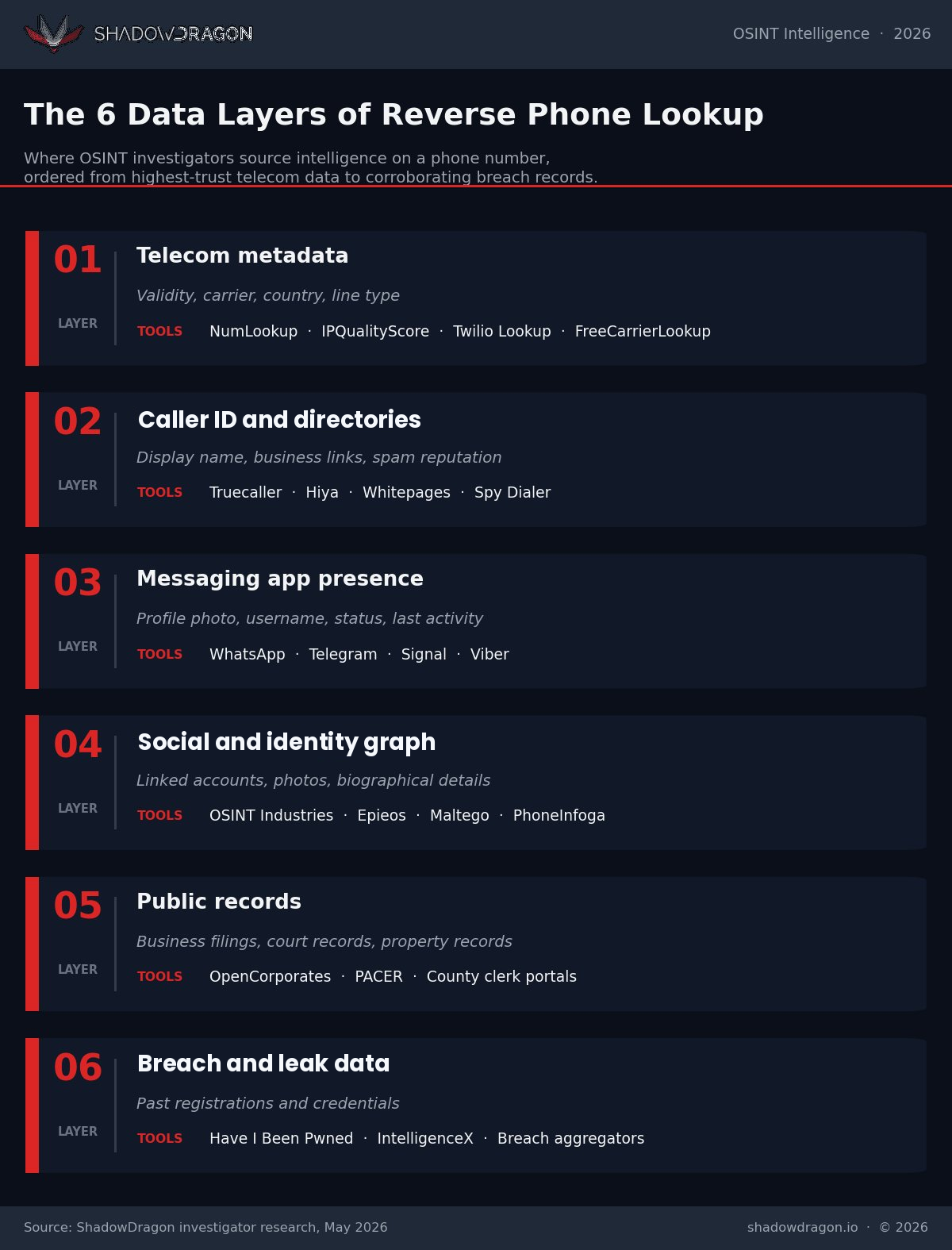
Infographic illustrating the six data layers of reverse phone lookup in OSINT investigations, including telecom metadata, caller ID directories, messaging app presence, social and identity graphs, public records, and breach data, with examples of tools used at each stage of phone number intelligence gathering
The six data layers of reverse phone lookup, from telecom metadata to breach and leak data.

What is reverse phone number lookup in OSINT?

Reverse phone number lookup is where you start with an unknown phone number and look through open sources to discover who owns it and learn what else is connected to that phone number. As part of OSINT, that means only utilizing public information and legal search methods. We don’t use non-public sources like subpoenaed carrier records or police databases.

Reverse phone lookup resources are categorized under “Telephone Numbers” in the OSINT Framework. But a useful reverse phone lookup rarely ends there. Since phone numbers are gateways into messaging apps, social networks, public records, breaches, and commercial registrations, we branch our search into these categories and then re-merge them together onto one subject.

You can end up with not just a name but also connections. You’ll find accounts, aliases, locations, and activities associated with that number.

Why phone numbers are valuable OSINT pivots

Think about how information is treated differently when a phone number is involved. You can create an email address in seconds then delete it just as fast if you wanted to. Usernames can change from week to week. Phone numbers are different. They have history and weight behind them.

Persistent identifiers

People keep the same phone number for years. They give them out to banks, doctors, employers, and Uber drivers. They use it to reset passwords on their most important accounts. Because of how long people keep their phone numbers, a single digit string can provide you access to registrations and accounts dating back 10+ years.

Cross-platform connectivity

Nearly all of the major communication and social platforms tie an account to a phone number upon signup/signin or require it for two-factor authentication. WhatsApp, Telegram, Signal, Viber, Snapchat, Facebook, Instagram, LinkedIn, X all link accounts to phone numbers that are verified. Performing a reverse lookup that pivots into these platforms can immediately expose profile pictures, screen names, last seen dates, and bio information.

Geographic and carrier signals

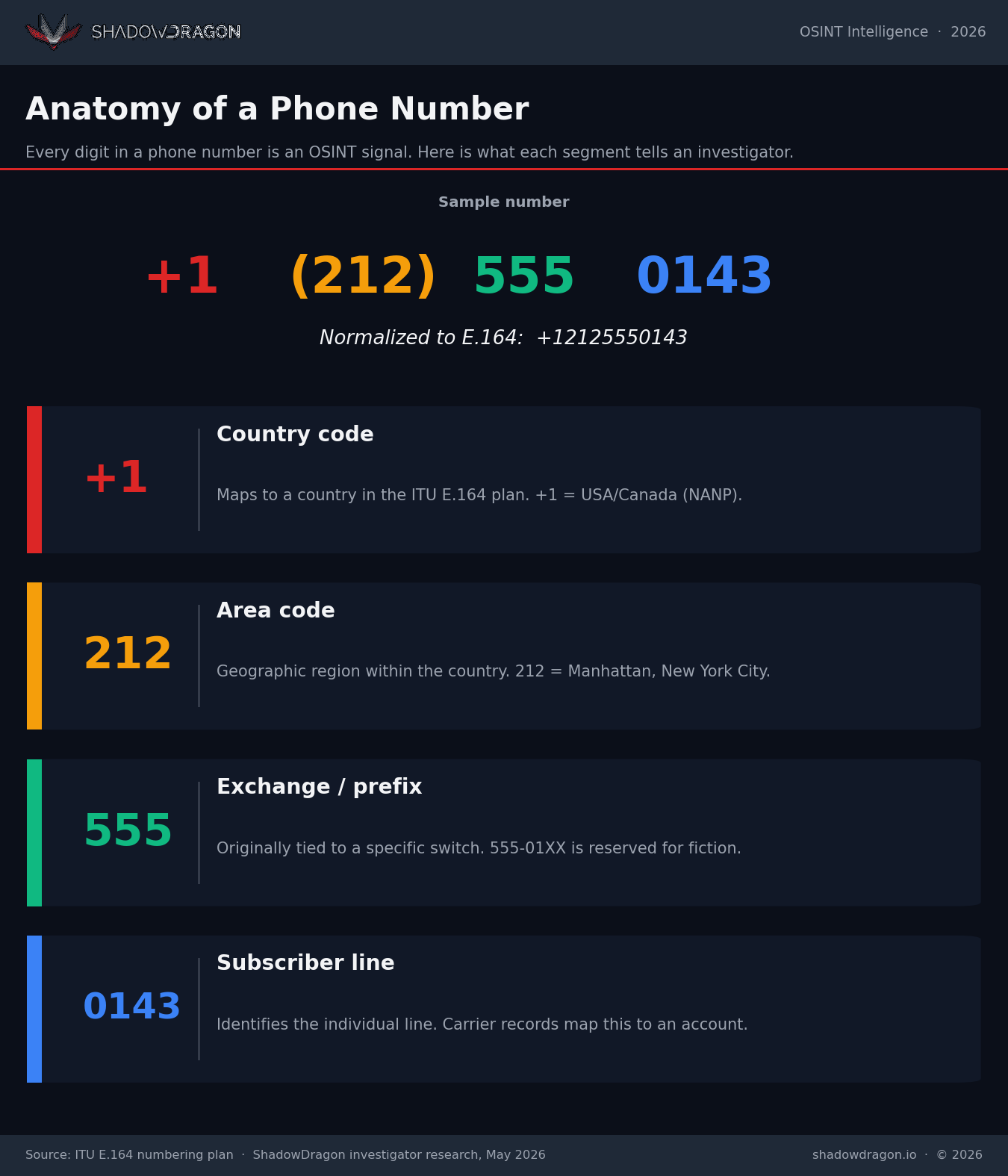
Location can also be uncovered through the phone number itself. Country code, area code, and prefix patterns will identify where the phone line was issued and what carrier the line is served by. Matching that data against timezone usage in social media posts or geolocation data in leaked documents can help confirm or eliminate where your investigation target may be based.

Where reverse phone lookup data comes from

Reverse phone lookup information is compiled from six unique data layers. Knowing which layer can answer your questions keeps your investigation on track and your conclusions sound. The graphic below breaks out these layers, the information you can discover and sources available to investigate them.


Phone Number OSINT Data Layers — ShadowDragon


Phone Number OSINT Data Layers • 2026

Data Layer What It Tells You Example Sources
Telecom metadata Number validity, line type, carrier, country, original area
NumLookupFreeCarrierLookupIPQualityScoreTwilio Lookup API
Caller ID and directories Display name, business association, spam reputation
TruecallerHiyaWhitepagesSpy Dialer
Messaging app presence Profile photo, username, status, last activity
WhatsAppTelegramSignalViber
Social and identity graph Linked accounts, photos, biographical details
OSINT IndustriesEpieosMaltego transformsPhoneInfoga
Public records Business filings, court records, voter rolls, property
OpenCorporatesPACERCounty clerk portals
Breach and leak data Past registrations and credentials
Have I Been PwnedIntelligenceXBreach aggregators
Methodology: Data layers organized by the type of intelligence a phone number can surface. Example sources reflect commonly used tools and are illustrative, not exhaustive.


How to use reverse phone number lookup for OSINT

Anytime you conduct a reverse phone lookup effectively, it should be a repeatable process. Below is a workflow you can use from quick searches to full investigations.

1. Lock down your operational security

Before you even begin searching, secure your tools. Search within a browser profile where you are not logged into Google, Facebook, or any other service that could tie your identity to the search. Proxy through a VPN connection, or virtual machine if it’s sensitive. At minimum, keep your WhatsApps and Telegrams on a burner phone or dedicated number for research. Searching for a target can add your profile picture to their search history.

2. Normalize the number

Put the number you’re looking up into a standard format. Use E.164 country code format with no spaces or punctuation. Example: 212-555-0143 in the U.S. would become +12125550143. Most search tools require this format, and normalizing the number the same way every time will help you from seeing duplicate results.

3. Validate and classify the line

Run verification on the phone number with IPQualityScore, NumLookup, or Twilio Lookup. Three things you can immediately know:

  • Is the number active?
  • Who owns the line?
  • Is it a mobile, landline or VoIP number?

If the number you’re researching resolves out to VoIP, prepare for a different set of returns downstream. VoIP numbers are easily tossed aside as they are usually disposable and have little association to actual identity.

4. Search the open web

Search Google and Bing with the number in quotes. Try different permutations: Include and exclude the country code. Add hyphens, parentheses, and dots. People often copy/paste their number on resumes, Craigslist, wiki pages, directory listings, personal blogs, forum signatures, and about us pages. Quoting the string forces an exact match and will pull up results that a broad search won’t.

5. Explore messaging apps

WhatsApp displays the user’s profile picture and status message if they have added one. Telegram displays usernames and when the person was last online if their discovery feature is turned on. Signal lets you know if the number is registered with them.

Viber, Skype and BOTIM are also useful platforms to check in countries where they’re popular. Add the number to your research contacts list, launch each app and take screenshots of everything right away. People have the ability to change these photos at any time, or prevent certain people from viewing them.

6. Run dedicated phone OSINT tools

Open source tools pull intelligence for you across multiple sources at once. Some of the top free tools for reverse phone lookup in OSINT are PhoneInfoga, NumLookup, IPQualityScore, Truecaller, and Epieos. PhoneInfoga is an international number command line scanner that automatically queries carrier info and search-engine fingerprints. Epieos and other advanced tools run hosted platforms that verify phone numbers against dozens of databases. See our directory of OSINT tools for more.

7. Cross reference social and identity graphs

Run any usernames, profile photos, or display names you’ve collected from steps 1-4 through reverse image searches, username lookup tools like Namechk and identity correlation platforms like ShadowDragon® Horizon®. Searching a WhatsApp profile image on Google Lens or PimEyes can connect the phone number to a LinkedIn profile, dating profile or a decades-old avatar from an ancient forum. This is where investigations start going from singular identifier collection to compiling a subject map.

8. Check breach and leak data

Phone numbers are commonly shared during data breaches alongside email addresses, plaintext usernames, and historical account data. Searching through breach finders associates the phone number with prior accounts and confirms whether the pattern you’re uncovering aligns with information someone may be trying to hide with their public social media profiles. Respect privacy laws regarding breach data depending on where the breach occurred and where your investigation is being conducted.

9. Document everything as you go

Take screenshots with dates/times and source URLs. Hash anything you download. Integrity matters when you’re trying to provide evidence. Hunchly does this automatically for browser-based research, and it creates a chain that will stand up to scrutiny. Notes made after-the-fact are notes you can’t justify.

10. Validate before you conclude

Cross-reference your attribution. Make sure the phone number belongs to that person via two independent methods before adding it to your data. A WhatsApp profile image that matches a publicly available LinkedIn profile image is good. A phone number found in one people finder with no external confirmation is weak.

Practical applications

Phone lookup is present in almost every investigative vertical you can think of. It’s simply the same process applied to different purposes.

Law enforcement and missing persons

Investigators in law enforcement run reverse phone lookup when they only have a phone number to identify a suspect. They also use it to run leads during missing persons cases and unravel criminal organizations by linking one person’s phone number to other individuals’ known accounts. It can also be applied to human trafficking investigations. Traffickers and victims often change phone numbers that are tied to throwaway accounts.

Fraud and financial crime

Fraud investigators can run phone numbers to identify synthetic identities, account takeovers, and scam call centers. If a phone number resolves to VoIP, has a spam reputation flag and has different names registered across people search sites, it could be a synthetic identity. ShadowDragon® has numerous capabilities that can assist with investigations like these in fraud and risk use cases.

Corporate security and executive protection

Due diligence on incoming contacts, verifying vendors/partners, researching suspicious recruiting emails targeting executives are all use cases for corporate security teams. Reverse lookup can also help determine how much exposure high-level leaders have online. One exposed personal cell phone number can lead to names of family members, home addresses and travel activity.

Threat intelligence and incident response

Cybersecurity teams track phone numbers tied to phishing campaigns, smishing operations and scammer networks. Phone numbers saved to the “contact” field of phishing kits often lead to already compromised operator Telegram or Jabber accounts. These can be used to peel back the layers on the rest of the crew. Layer that dataset with network metadata and you can begin to attribute a campaign.

Journalism and research

Reporters have turned to reverse phone lookup to vet their sources, confirm identities of the humans operating behind disinformation networks, and trace shell companies. Phone numbers on business registrations, Craigslist postings, lobbying disclosures have provided footholds into these otherwise opaque private entities.

Due diligence and background checks

Compliance teams tasked with Know Your Customer (KYC), anti-money laundering (AML), and acquisition due diligence screenings have used reverse phone lookup to verify principals, uncover sanctioned parties using aliases, and reveal obscured business relationships.

Limitations and challenges

Like any powerful tool, this technique does have practical limits. An awareness of these limitations can help you avoid incorrect assumptions and better protect your work product.

VoIP and burner phones

VoIP and burner phones present the biggest challenge. Google Voice, TextNow, Skype, and many regional services provide numbers which may appear to belong to a mobile line, but which contain no persistent identity. A determined subject who frequently changes (“cycles”) phones can thwart even the most complete analysis. If you find yourself in this situation, rely more on behavioral correlation, network analysis, and the email or username layer of identity rather than the phone number itself.

Privacy controls

The ability for users to hide WhatsApp profile pictures from non-contacts, turn off Telegram discovery, and opt-out of people finder sites is growing. What public profile information is available on a phone number today may not be available next week. Be prepared to capture and document at the time of investigation.

Data accuracy

Carrier metadata should be highly accurate. Live messaging app phone numbers are usually accurate. Crowdsourced caller ID apps can be noisy, but useful. People finder websites will often cache old registrations and not delete them. Data from two unrelated sources should be used to confirm any deduction before publishing in your report.

Legal considerations

Reverse phone lookup based solely on public information is legal in most areas. Pretending to be someone you’re not (pretexting), hacking carrier databases, and continued contact with the intended subject are illegal no matter the method used. In the United States, FCC rules around pretexting and the Gramm-Leach Bliley Act (GLBA) apply to investigative uses of phone records. The Global Data Protection Regulation (GDPR) substantially raises the bar for processing any personal data, such as phone numbers, throughout the EU and UK, even if discovered through investigation of public forum posts. California Consumer Privacy Act (CCPA) offers similar requirements. When in doubt, consult a lawyer. Obtain a documented lawful basis for each investigation.

Beyond manual lookup: enterprise OSINT platforms

Manual lookup is zero cost and high credibility. It’s just not scalable. Ten lookups is manageable. Ten thousand lookups means you need automation, normalization, and analyst workflows that were never meant to exist in a spreadsheet.

ShadowDragon®’s Horizon® investigation platform brings OSINT phone lookup to your analyst’s desktop. Identity Rapid Triage starts with a phone number (or any other selector) and generates a normalized subject profile from hundreds of sources in seconds. SocialNet® API links those phone signals to social, messenger, and identity graphs for powerful link analysis. Together, they turn what would otherwise be hours of manual effort into a task your analysts can complete before lunch.

Final thoughts

Reverse phone lookup is an investigation. Successful investigators that do this sort of thing seriously treat it like a process. Workflows. Start with tight operational security. Normalize, confirm, and pivot carefully through the messaging layer and social layer. Take notes. Confirm before you share.

If you’re looking to do this at scale for your organization, ShadowDragon®’s platform automates these steps and places them all into one workspace for phone-centric OSINT investigations. Contact our team to request a demo and see where reverse phone lookup can integrate into your investigations.

Frequently asked questions

What is reverse phone number lookup in OSINT?

Reverse phone lookup in OSINT enables you to start with a phone number and try to learn who it belongs to using online directories, messengers, social networks, open source intelligence tools, etc. Gathering details on individuals, beginning with their phone numbers, frequently serves as a vital initial step in investigations. Utilizing public directories and the information individuals have openly shared allows for legal identification of a phone number’s owner.

Is reverse phone number lookup legal?

Don’t use pretexting (or otherwise improper means) to access carrier records or to harass another person. In the United States, that would be FCC rules against pretexting and the GLBA. The GDPR covers the EU and UK, and CCPA covers California. You’ll typically be governed by your local privacy laws.

What is the best free reverse phone lookup tool for OSINT?

PhoneInfoga is commonly used for automated multi-source lookups. NumLookup and the IPQualityScore phone validator are great resources for lookups/validation quickly. Epieos and OSINT Industries are great resources for social/messaging correlation. Feel free to reference our full list of free OSINT tools.

Can a phone number be traced to a specific person?

Yes, frequently. Unless the phone number is VoIP or a burner that is designed to not identify, if the mobile number is connected to a carrier account that has been active for some time, it will likely lead to one subject when combined with social accounts and messenger information.


How accurate is reverse phone lookup data?

It depends on the source. Carrier metadata/live messenger app data tends to be the most accurate. Crowdsourced Caller ID services and people search sites tend to be stale. Verify clues with at least two unrelated sources before you trust them.

How do investigators handle VoIP or burner numbers?

Investigators pivot off behavior, infrastructure patterns and account creation patterns rather than the phone number itself. One benefit of having tools that identify VoIP carrier services is also useful. Pivoting off email addresses or usernames associated with the number can often lead to better clues than the phone number itself.

What is the difference between reverse phone lookup and phone forensics?

Reverse phone lookup will leverage open source data to identify/location contextualize a number’s owner. Phone forensics is the technical analysis of the actual device to recover messages, location information, deleted data, etc. One is an OSINT discipline. The other requires a search warrant/written permission and the device itself.